
Piso WiFi Vendo Machine: Setup, Price and Buying Guide 2026
Piso Vendo Wifi Machine is a coin operated machine that facilitates the local people in the Philippines to pay a lesser amount for internet access. This machine operates on coins, vouchers or some shops also allows an Online payment via Maya or Gcash system.
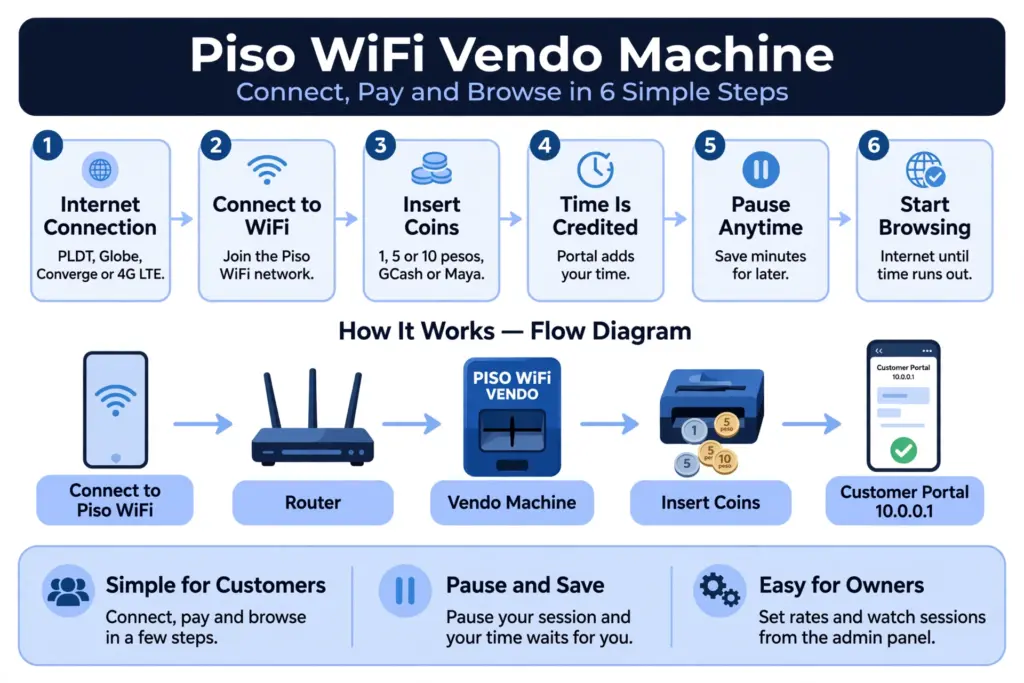
In this guide users will learn about what Piso wifi vendo machine is and how it will operate, its pause time system on 10.0.0.1 web portal, machine prices and common typo variants errors that block the login page from loading.
What Is a Piso WiFi Vendo?
Piso Wifi vendo machine is a prepaid wireless internet box like machines that are usually seen in local Filipino shops like sari sari stores and in many places it also locates outside the local homes.
A Piso WiFi Vendo Machine is a vending machine for prepaid Wi-Fi hotspots that operates on coins and is popular in the Philippines, offering internet access for a set time in return for coins (like ₱1, ₱5, or ₱10).
How a Piso WiFi Vendo Machine Works
A Piso WiFi vending machine operates by offering low-cost, pay-as-you-go internet access via an automated WiFi vending mechanism. The device links to a current internet service and enables users to buy internet access for a designated duration.
Internet Connection: The machine connects to an existing internet service from providers such as PLDT, Globe, or Converge. Some setups also support 4G LTE connections.
WiFi Network Access: Customers search for and connect to the machine’s WiFi network using their smartphones, tablets, or laptops.
Payment Process: After connecting, customers are directed to a captive portal where they can insert coins or select an available digital payment option, such as GCash or Maya, depending on the machine’s features.
Automatic Internet Activation: Once payment is confirmed, the Piso WiFi system automatically credits the corresponding internet time and grants the customer access.
Session and Time Management: The machine tracks the customer’s remaining browsing time. When the purchased time expires, internet access is automatically disconnected.
Where Piso WiFi Vendo Machines Are Used
Following are the name of the locations where Piso Wifi Vendo Machines are found:
Piso WiFi Vendo Machine Parts and Price
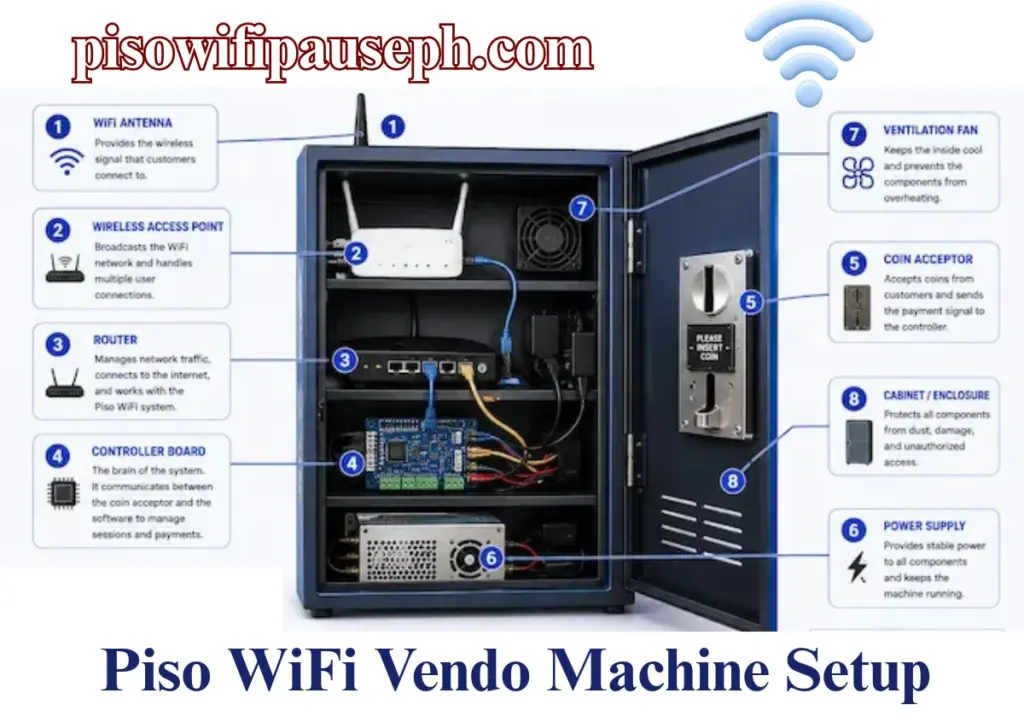
A Piso WiFi vendo machine is made up of three main components: a microcomputer or single-board computer, a coin slot mechanism, and an external wireless antenna or router.
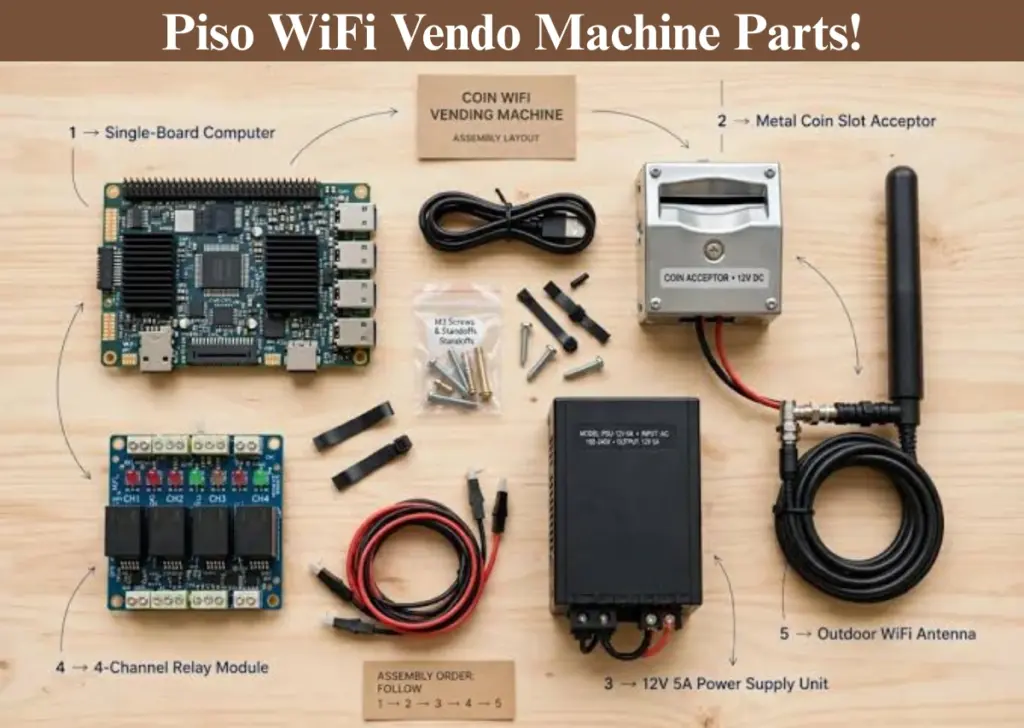
You can buy its components individually or buy complete DIY kits online via marketplaces.
Once your machine is set up, you can also learn how to use the 10.0.0.1 Piso WiFi Pause Time Android feature to pause your internet session and make the most of your purchased time.
Common Parts Inside a Vendo Machine
Piso WiFi Vendo Machine Price in the Philippines
Below is a general price comparison to help you understand your options before purchasing.
| Piso WiFi Setup Type | Estimated Price | What’s Included |
|---|---|---|
| DIY Piso WiFi Starter Kit | ₱5,500-₱9,000 | Basic router or controller, coin acceptor, and compatible firmware or software license. |
| Basic Plug-and-Play Unit | ₱5,000-₱10,000 | Pre-assembled machine with a router, coin slot, enclosure, and configured vending system. |
| Complete Piso WiFi Vendo Machine | ₱8,000-₱18,000+ | Ready-to-use setup that may include an outdoor access point, antenna, metal enclosure, coin acceptor, and installed software. |
| Piso WiFi Machine Casing Only | ₱900-₱1,500+ | Physical metal or wooden enclosure without the router, controller, coin acceptor, or other electronic components. |
Note: These represent suggested price ranges in Philippine pesos, rather than established market prices. Real expenses differ based on the seller, hardware features, software licenses, and included accessories.
DIY Kit vs Plug and Play Machine
While setting up Piso Wifi Business machine many owners get confused in deciding whether to buy the whole DIY Kit or get individual source components to build it by themselves.
Both options allow you to offer affordable internet access, but they differ in setup requirements, costs, and ease of use.
| Feature | DIY Piso WiFi Kit | Plug-and-Play Machine |
|---|---|---|
| Initial cost | Generally more affordable | Usually more expensive |
| Installation | Requires manual assembly and configuration | Mostly pre-assembled |
| Technical skills | Basic networking knowledge is helpful | Minimal technical knowledge required |
| Customization | More flexibility to choose hardware and components | Depends on the machine and manufacturer |
| Setup time | Takes longer to configure | Faster installation |
| Maintenance | You may need to troubleshoot components yourself | May include seller support, depending on the package |
| Best for | Technically skilled users and budget-conscious beginners | First-time owners who want a simpler setup |
Piso Wifi Vendo Machine Pause Time
The appropriate login URL for the majority of Piso WiFi vending machines is 10.0.0.1. Here is where users can pay for sessions, view the remaining time, and pause their connection if that feature is available.
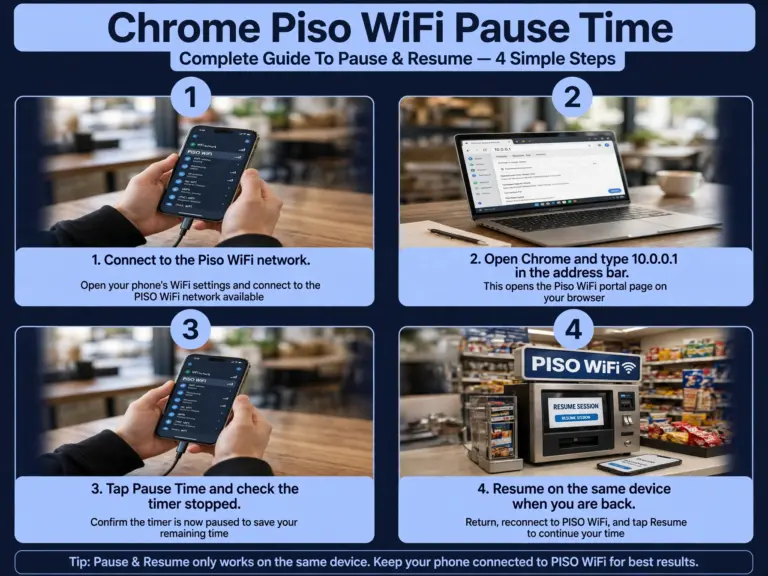
How To Pause Piso Session On Vendo Machine Via 10.0 0.1
Here is a simple procedure for users to pause their Online session on Vendo machine via 10.0.0.1:
Link your device to the Piso WiFi vendo network.
Launch a web browser and enter http://10.0.0.1 in the address field.
Allow the portal page to completely load.
Press the Pause button to halt your remaining time.
Click Resume later to pick up your browsing from the point you stopped.
Importance: Taking a break stops unnecessary time loss when you move away from your device. In the absence of this feature, the paid timer continues to decrease even if you are not actively engaging with the connection.
Pausing on Windows and Windows 10
Piso wifi pause time session system and procedure is farely same for windows or window 10 as the pausing methods provided above in Phone. However, with a little change that needs to come in your knowledge.
Link your Windows PC to the vendor’s WiFi network. Tap the WiFi symbol on the taskbar and choose the appropriate network.
Launch any web browser, like Chrome or Edge.
Enter 10.0.0.1 in the address bar, not in the search bar at the top of the browser.
Verify that the portal is loading. If it does not, verify your current connection gateway through Command Prompt.
Press Pause on the opened portal page.
Verifying your Windows gateway: Launch Command Prompt and enter ipconfig, then find the Default Gateway section associated with your active network adapter. If it doesn’t display 10.0.0.1, your particular vending machine probably utilizes another address.
Where to Buy a Piso WiFi Vendo Machine
There are many official online portals like Lazada Philippines where people can easily buy the Piso Wifi vendo Machine component parts and its DIY kit or they can also get it from the local machine market in the Philippines.
How to Choose a Supplier
Pick a supplier you can call when the machine stops working, not just the cheapest one.
Buy pre-built if you are a beginner LPB and AdoPiSoft machines arrive tested and ready to use. DIY kits save around ₱3,000 to ₱5,000, but you wire the parts yourself.
Check what is included: coin slot for ₱1, ₱5, ₱10 and ₱20, admin panel at 10.0.0.1, voucher system, and cloud monitoring.
Ask about warranty and support before you pay. Many sellers offer 30 days to 3 months.
Check reviews and ask for a video of a working machine. Be careful with Marketplace sellers who offer no warranty.
What to Check Before Buying a Used Machine
Test the machine before you pay. A used machine is only a deal if it works.
Test the coin slot, the container, and the latch. Check for rust and dents, and ensure the keys are present.
Inquire about the router model and verify if it continues to receive updates. Inquire about the reason for the seller’s sale and what repairs have been made previously.
How to Set Up a Piso WiFi Vendo Machine
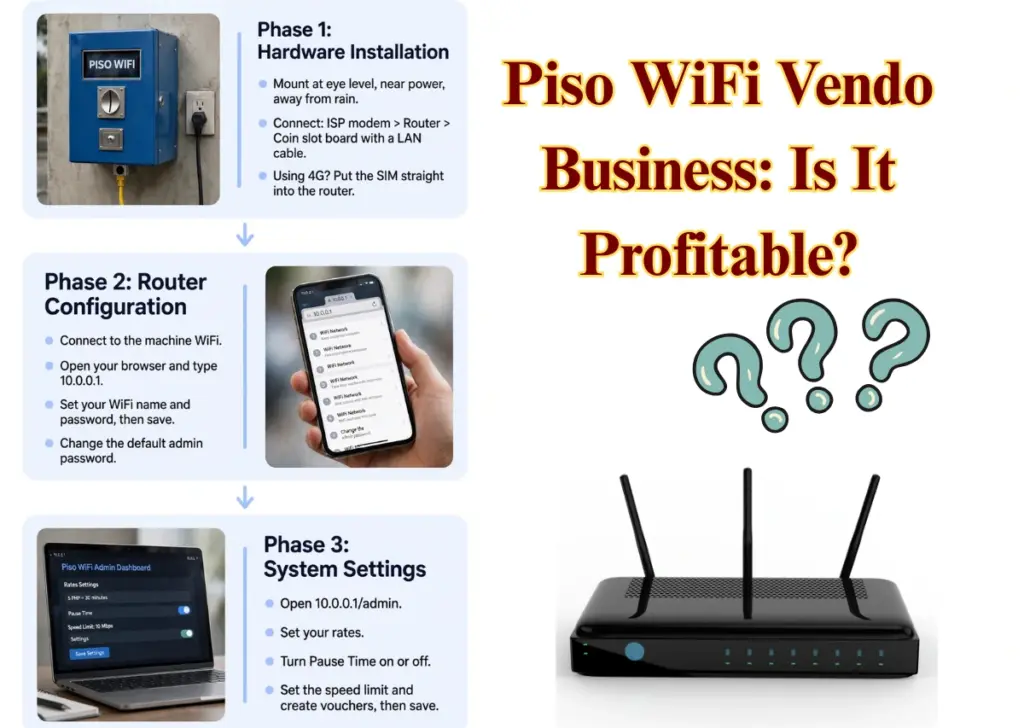
Setting up a Piso WiFi machine has three parts. Do them in this order, then test the machine before you open it to customers.
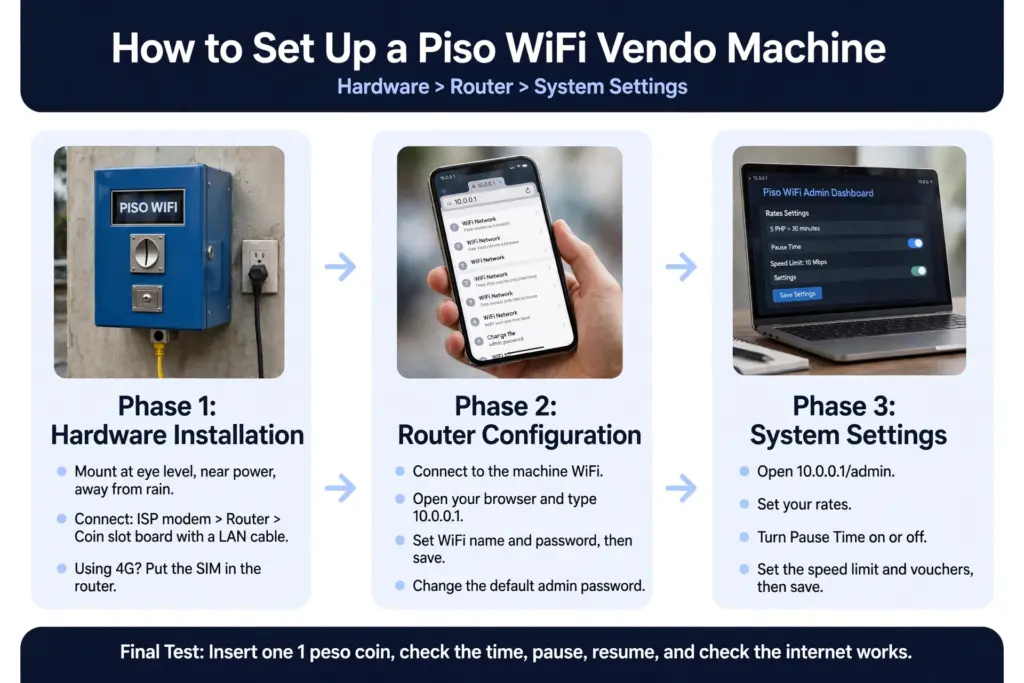
Hardware > Router > System settings
Phase 1: Hardware Installation
Mount the machine at eye level, near a power outlet, and away from direct rain.
Connect it like this: ISP modem > Piso WiFi router > coin slot board, with a LAN cable.
If you use 4G/LTE, put the SIM straight into the router. You do not need a separate modem.
Phase 2: Router Configuration
Connect to the machine WiFi.
Open your browser and type 10.0.0.1.
Set your WiFi name (SSID) and password, then save.
Change the default admin password and keep it private.
Phase 3: System Settings
Most owners use LPB, AdoPiSoft, or JuanFi from the admin panel, not the TP-Link Omada method.
Open 10.0.0.1/admin.
Set your rates.
Turn Pause Time on or off.
Set the speed limit.
Create vouchers, if you use them.
Save.
Note: use the Omada method only if you run TP-Link EAP access points with the Omada controller.
What You Need Before Setup
Following are some of the main components that is important for every piso wifi owners who are about to start their new business or setting up Piso station at home:
Piso WiFi Vendo Firmware: LPB, AdoPiSoft and JuanFi
Piso wifi vendo firmware is a kind of software inside every peso machine that controls the visibility at user’s end. It controls what the customer sees on the portal, the rates, the pause button, and the vouchers. LPB, AdoPiSoft, and JuanFi are the three main software options.
LPB Piso Wifi: the most popular one. Simple admin panel, ready-made machines, best for beginners.
AdoPiSoft: best if you want clear pause control. It shows a timer with Pause, Continue, and Resume.
JuanFi: free and open-source, runs on MikroTik. Best for technical owners who want full control and do not mind extra setup.
How to Use a Piso WiFi Vendo Machine
Using a Piso Wifi vendo machine is not too complicated, as it is itself a coin operated prepaid internet device that provides a good amount of net minutes in less payment. In the below section a very detailed procedure of the Piso Wifi vendo machine is discussed.
How to Connect and Start a Session
Turn on Wi-Fi: Firstly you need to enable Wi-Fi on your mobile phone, tablet, or laptop.
Connect to the Network: Look for the machine’s broadcasted SSID (such as PisoWiFi or a local store name) in your available networks list and tap to connect.
Open the Portal:
- A login or captive portal page should pop up automatically.
- If it does not appear, open a web browser (like Chrome or Safari) and type 10.0.0.1 into the address bar to manually load the dashboard.
Insert Money:
- Tap the “Insert Money” option on the portal screen.
- Drop your coins (such as a ₱1 coin for 10 minutes, or higher denominations depending on the machine’s rates) into the physical coin slot on the vendo box.
Start Your Session: Once you have inserted the desired amount, click “Done”, “Done Pay”, or “Connect” on the screen to activate your internet time.
How to Pause Your Piso WiFi Vendo Session
Connect to the Piso WiFi network.
Open the portal through Chrome.
Confirm your session is active.
Check how much time you have remaining.
Select Pause Time if the option is visible.
Look for a confirmation that the session has paused.
Piso WiFi Vendo Business: Is It Profitable?
It depends on many factors for the Piso wifi business to be profitable as many aspects need to be checked and planned before setting up the Piso wifi Vendo Machine Business in the Philippines.
In which location is one of the most crucial factors that can’t be neglected when you are starting your fresh Peso machine business.
Key Factors for Setting Up a Piso WiFi Machine
| Sr. No. | Key Factor | Important Requirements |
|---|---|---|
| 1 | Location | High-traffic areas, stores, boarding houses, and residential neighborhoods. |
| 2 | Internet Connection | Reliable, unlimited fiber internet connection. |
| 3 | Maintenance | Low electricity consumption, remote monitoring, and minimal maintenance. |
| 4 | Risks & Challenges | Market competition, power outages, hardware damage, and local permits. |
Troubleshooting Piso WiFi Vendo Problems
Most vendo problems have a simple cause. Try the fix below first, and reset the machine only if nothing else works.
Piso WiFi Vendo No Internet Connection
Problem:
Customers connect to the WiFi but the internet does not work.
Solution:
Piso WiFi Vendo Obtaining IP Address
Problem:
The phone gets stuck on “Obtaining IP address” and never connects.
Solution:
10.0.0.1 Will Not Load on a Vendo Machine
Problem:
The portal page does not open when you type 10.0.0.1.
Solution:
Pause Time Not Working on a Vendo Machine
Problem:
The Pause button does not show, or the timer keeps running after you tap Pause.
Solution:
Conclusion
A Piso WiFi Vendo Machine is an affordable way to provide prepaid internet access and start a small WiFi vending business in the Philippines. Whether you choose a DIY kit or a plug-and-play unit, understanding its components, setup process, firmware, and price is essential before making a purchase.
3 Comments
Comments are closed.